


How Do QR Codes Work? The Data Trick Inside
I see QR codes everywhere now: restaurant tables, payment counters, parcels, tickets, even tiny stickers on machines. What still makes me stop is the amount of information that seems to hide inside a square of black-and-white blocks.
A QR code looks almost chaotic. It is not. Underneath those little modules is a very deliberate layout designed so a camera can locate the square, work out its orientation, read the pattern, and recover the message even when part of the code is dirty or damaged.
A QR Code Is More Than a Picture
A QR code is a two-dimensional barcode. A normal product barcode stores information mainly along one direction, using the widths and spacing of vertical bars. A QR code uses a grid, so it can pack information across both rows and columns.
The basic building block is called a module. A module is simply one small dark or light square in the grid. The pattern may look like a picture, but the scanner is really interpreting a carefully arranged binary structure.
The letters QR stand for Quick Response. The system was developed in Japan by Denso Wave in the 1990s for tracking automobile parts. That original use matters because the design was built for fast machine reading, not for making a decorative-looking symbol. The QR Code (opens in a new tab) system later spread far beyond factories and into everyday consumer products.
And that is the first little surprise: the scanner is not asking what the picture looks like. It is asking how the grid is organized.
Why the corners look like targets
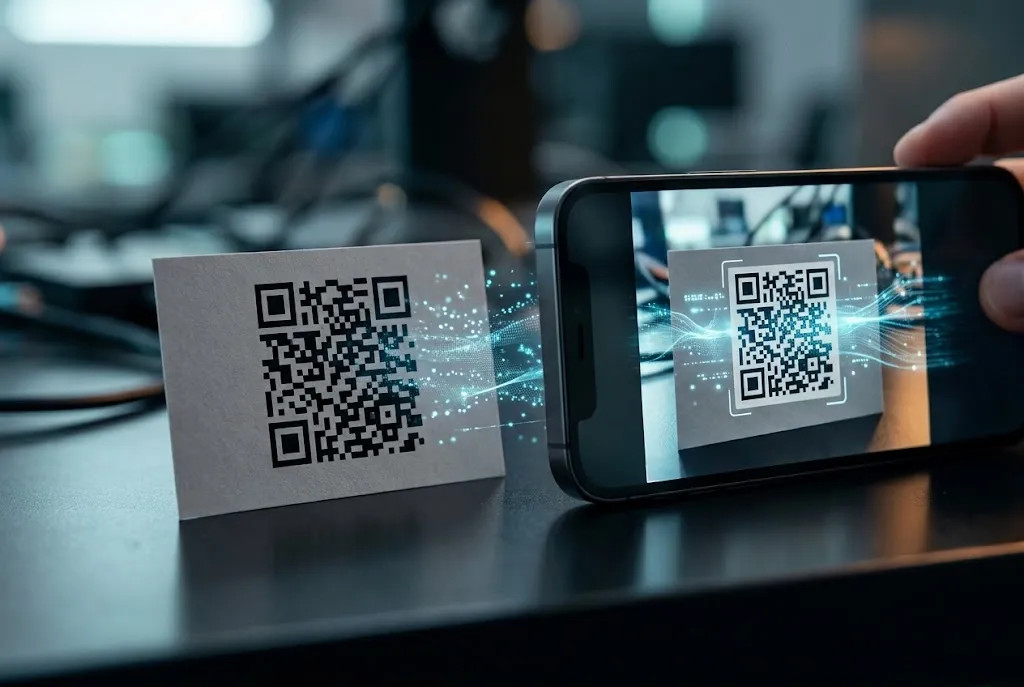
Look at most QR codes and you will notice large square patterns near three corners. These are finder patterns. They give the reader obvious landmarks, helping it locate the code and estimate its orientation.
The scanner can see those repeated black-and-white shapes and infer where the symbol begins, even when the code is tilted. It then maps the rest of the modules into a square grid.
That is why you can often scan a QR code from an angle without carefully lining your phone up perfectly. The software is correcting for perspective before it interprets the actual data.
I think this is one of the nicest bits of engineering in the whole system. The code contains its own visual clues for being found.
How Your Phone Finds the Code
When I point a phone camera at a QR code, the first useful thing is not the message itself. The phone has to decide that the strange square in front of it is actually a QR code.
The camera produces an image, and software looks for the characteristic geometric patterns. In a typical scanning flow, the program searches for the finder patterns, estimates the corners of the symbol, and applies a perspective transformation so the code can be treated more like a straight-on square.
This is closely related to the image-processing work happening inside a smartphone camera itself, where a stream of light captured by a sensor becomes a usable digital image through several processing stages. That camera pipeline is built for photography, while QR recognition uses the resulting frames as raw material for machine vision.
Once the software has a stable view, it can determine the grid size and sample the individual modules. A dark square is not simply “ink” and a light square is not simply “paper.” Their positions have meaning.
The quiet white border has a job
There is normally a margin of blank space around the outside of a QR code called the quiet zone. It helps separate the symbol from surrounding patterns, text, and edges in the scene.
That sounds minor. It is not.
Imagine trying to find a chessboard in a photograph when it touches another checkerboard. A little breathing room makes the object much easier to identify. The same idea helps a scanner isolate a QR code before decoding it.
Perspective correction does the heavy lifting
A QR code printed on a wall is rarely a perfect square from the camera's point of view. One side can look narrower because of perspective. The phone can compensate by estimating where the code's four corners actually are and remapping the image into a normalized square.
This is why a code can still work when I scan it from the side. The software is not demanding a textbook-perfect photograph. It is mathematically undoing much of the viewpoint distortion first.
This is why a QR code can feel almost magical in everyday use: your phone is doing geometry before it ever gets to the message.
How the Black-and-White Squares Become Data
Finding the code is only half the trick. The reader still has to interpret the module pattern as information.
QR codes can use different encoding modes, including modes suited to numeric data, text characters, and byte data. The choice affects how efficiently information can be packed into the available modules.
Before the reader treats every square as payload, it also has to account for the parts of the symbol that have structural jobs. Finder patterns, timing patterns, alignment patterns in larger versions, format information, and other reserved regions help the decoder understand how the grid is arranged.
What remains carries the encoded message along with error-correction information. The QR Code specification history and structure (opens in a new tab) reflect that original goal of making the symbol quick for machines to locate and read.
The reason damaged codes can still scan
This is the part that makes QR codes much tougher than they look.
A QR code uses error-correction coding based on Reed–Solomon error correction (opens in a new tab). Extra information is stored so the decoder can recover the intended data when some modules cannot be read correctly.
In practical terms, that means a smear, small tear, or dirty patch does not necessarily destroy the entire symbol. The exact amount of damage a code can tolerate depends on the selected error-correction level and how the damage is distributed.
There is a trade-off. More error correction requires more space, so less room remains for the actual payload at a given symbol size.
That is also why a QR code with a logo printed over its center can still work sometimes, but not because the logo is somehow “understood.” The decoder is simply recovering missing information within the limits allowed by its error-correction design.
What actually happens after decoding?
Suppose the decoded payload is a web address. The QR reader does not need the code itself to contain a webpage. It contains data representing the URL, and the phone can then hand that URL to the appropriate application or browser.
For a contact card, Wi-Fi setup record, calendar event, or plain sentence, the same broad idea applies: the square stores structured data, and the receiving software decides what that data means.
That separation is useful. The QR code is a carrier. The phone supplies the software that interprets the carrier.
Why Some QR Codes Scan Faster Than Others
Not every code is equally easy for a camera to read. Size matters because tiny modules leave fewer pixels for the camera to distinguish. Focus matters too. So does contrast, lighting, motion blur, and the quality of the printed surface.
The camera also benefits from a clean view of the finder patterns and a visible quiet zone. A beautifully designed code can become a poor scanner target if someone surrounds it with a busy border or shrinks its modules until they blur together.
This is where the physical world catches up with the math. A perfect QR encoding can still fail when the camera cannot reliably separate one module from the next.
I notice the same principle at payment counters. A bright screen, reflective plastic, or a fingerprint across a printed code can change the image enough to slow recognition. The underlying data has not changed. The signal reaching the camera has.
More information means a more complicated symbol
QR codes come in different versions, with larger grids able to hold more data. As the amount of information grows, the symbol generally gains more modules and becomes more visually dense.
That creates a practical design choice: use a larger code, encode less data, or accept a smaller margin for easy scanning. A short URL can make a much simpler symbol than a long block of text.
For everyday users, the lesson is straightforward. The simplest useful payload is often the easiest one to scan.
Why QR Codes Survived for So Long
I think the technology's staying power comes from an unusually good balance between cheap physical printing and sophisticated software. The code itself needs no battery, radio transmitter, or active electronics. A printed square can sit on a poster for months while a modern phone supplies the computational muscle.
It also scales nicely. The same basic concept can appear on a shipping label, a restaurant menu, a train ticket, or a museum display. The surface changes. The decoding logic remains recognizable.
There is a second advantage that is easy to overlook: the information can be changed without changing the scanning hardware. A phone does not need a special laser reader for each application. Its camera can capture the pattern, while software handles the interpretation.
That is why I can use essentially the same kind of scanner to read something printed on cardboard and something displayed on another phone.
The Clever Trick Is Not the Squares
The black-and-white pattern gets all the attention, but the real engineering is the structure around it. The finder patterns tell the reader where to look. The grid tells it how to sample the symbol. Error correction gives it a chance to recover when the view is imperfect.
Put those pieces together and the QR code stops looking like visual noise. It starts looking like what it really is: a carefully engineered interface between a physical pattern and digital information.
And that is the bit I find most satisfying. A square of ink does almost nothing by itself. Give it a camera and the right software, and a few hundred tiny geometric decisions can turn into a web address, a payment request, or a ticket in less than a second.
The next time I see one taped to a café table, it will be hard not to notice the hidden machinery inside it.
Takeaway
A QR code works because the pattern is designed for a camera to find, straighten, sample, and decode, with built-in error correction helping it survive real-world damage. It is not a picture with secret meaning. It is a compact, fault-tolerant data structure that happens to fit on paper.
And those little squares? They are doing far more than they look capable of.




Conversation0
No comments yet. Be the first to share a thought — the best questions often become new stories.